
Precipitate DNA
This step uses 100% 2-propanol and PM1 to precipitate the DNA.
 Consumables
| • | 100% 2-propanol |
| • | PM1 |
| • | Foil adhesive seal |
| • | Kimwipes |
Preparation
| 1. | If the WGA plate was stored at -25°C to -15°C, thaw to room temperature, vortex at 1600 rpm for 1 minute, and then centrifuge at 280 × g for 1 minute. |
| 2. | Remove and discard the cap. |
| 3. | Prepare the following consumables: |
|
Reagent |
Storage |
Instructions |
|---|---|---|
|
PM1 |
2°C to 8°C |
Thaw at room temperature. Vortex or invert 10 times to mix. Centrifuge reagent tubes at 280 x g for 1 minute, or flick bottle to remove reagent from lid. |
| 4. | Prepare the required amount of PM1 and isopropanol reagent according to instructions on the interface. |
|
Number of samples |
PM1 |
Isopropanol (ml) |
|---|---|---|
|
48 |
2 tubes |
35 |
|
96 |
2 tubes |
50 |
|
192 |
4 tubes |
90 |
|
288 |
6 tubes |
120 |
|
384 |
1 60-ml bottle |
160 |
|
480 |
1 60-ml bottle |
200 |
|
576 |
2 60-ml bottle |
240 |
| 5. | Set refrigerated centrifuge to 4°C. |
Procedure
| 1. | Open ILASS on the Infinium Automated Pipetting System. |
| 2. | If running with PGx, select Infinium Genotyping Assay with PGx, then Precipitate DNA. |
If running without PGx, select Infinium Genotyping Assay, then Precipitate DNA.
| 3. | Select the Product Type drop-down, and then select your product type. |
| 4. | In the Container Input Quantity box, enter the number of 96-well plates to be processed. Manually enter the value or set the value using +/-. |
ILASS displays the number of required materials based on number of plates.
| 5. | Select Continue. |
| 6. | Setup the Infinium Automated Pipetting System worktable as shown on the interface, according to number of plates used in the run. |
| 7. | Before loading the worktable, mix PM1 by inverting 10 times and centrifuging at 280 x g for 1 minute for reagent tubes, or flick 60 ml bottle to remove reagent from lid. |
| 8. | Pour PM1 reagent into the PM1 half-trough. |
| 9. | Pour the required amount of isopropanol into 2-propanol full-trough. |
| 10. | Select Auto-Scan Item(s). |
| 11. | Manually enter information for trough reagents by following the user interface. |
| 12. | After successful scanning, the user interface displays a timer. |
| 13. | Select Execute Run. |
| 14. | Wait for the Infinium Automated Pipetting System to finish the run. |
| 15. | Seal the WGA plates with foil adhesive seal. |
| 16. | Remove troughs from the worktable. Discard residual reagent volume. Clean troughs with DI water. |
| 17. | Invert the plate 10 times to mix. |
| 18. | Centrifuge at 3000 × g at 4°C for 20 minutes. |
| • | When centrifuging is complete, proceed immediately to the next step |
| • | If a delay occurs, repeat the 20 minute centrifuge. |
| 19. | Remove WGA plate |
| 20. | Make sure that a blue pellet is present |
| 21. | Remove and discard the foil adhesive seal. |
| 22. | Hold the plate over an absorbent pad and do as follows. |
| a. | Quickly invert to decant the supernatant. |
| b. | Drain liquid onto the absorbent pad, and then firmly tap the plate down on a dry area of the pad. |
| c. | Keeping the plate inverted, use a Kimwipe to remove any residual alcohol on the surface of the plate or draining from the wells of the plate. |
| d. |
|
| e. | Place the |
| f. | Make sure that a blue pellet is still present |
Inverted WGA Plate
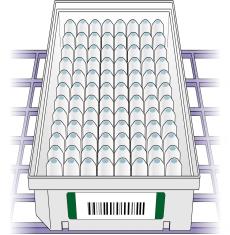
Do not overdry the pellets. Pellets that are overdried are difficult to resuspend and can lead to poor data quality.
