
Power On iScan Computer and Reader
| 1. | Make sure that the iScan Reader has been off for at least two minutes. |
| 2. | Press the power button on the instrument control computer. |
| 3. | Press the power on (|) side of the toggle switch on the back of the instrument. |
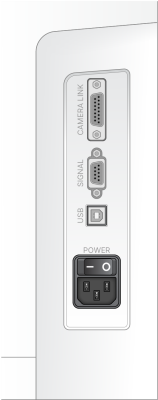
The iScan Reader status indicator lights on the front panel show the status as the instrument initializes. For more information on status indicator lights, refer to Status Lights.
If the iScan Reader fails to initialize or conditionally initializes, reinitialize it. For details, refer to Reinitialize the iScan Reader.
Before starting a scan, the lasers must stabilize. Make sure that the iScan Reader has been on for at least 5 minutes before beginning a scan.
| 4. | When the operating system is loaded, sign in to Windows. |
