
Instrument Components
iSeq 100 Sequencing System comprises a power button, monitor, status bar, consumables compartment, and drip tray.
External System Components
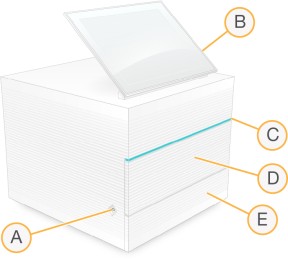
- Power button—Controls instrument power and indicates whether the system is on (glows), off (dark), or off but with AC power (pulses).
- Touch-screen monitor—Enables on-instrument configuration and setup using the iSeq 100 Control Software interface.
- Status bar—Indicates system status as ready to sequence (green), processing (blue), or needs attention (orange).
- Consumables compartment—Contains consumables during a run.
- Drip tray door—Provides access to the drip tray, which catches leaked fluids.
 Power and Auxiliary Connections
You can move the instrument to access USB ports and other rear panel components.
The back of the instrument has the switch and inlet that controls power to the instrument and an Ethernet port for an optional Ethernet connection. Two USB ports provide the option to connect a mouse and keyboard or upload and download data using a portable device.
Connecting the system to a keyboard and mouse overrides the onscreen keyboard.
Rear Panel Components
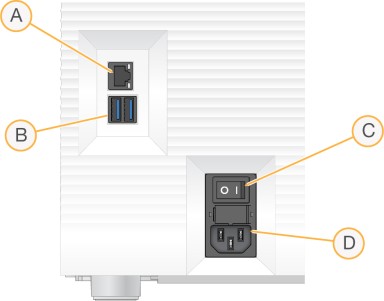
- Ethernet port—Optional Ethernet cable connection.
- USB ports—Two ports for connecting auxiliary components.
- Toggle switch—Turns instrument power on and off.
- AC power inlet—Power cord connection.
Consumables Compartment
The consumables compartment contains the cartridge for a sequencing run.
Loaded Consumables Compartment
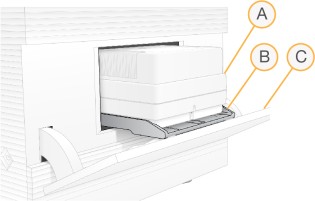
- Cartridge—Contains the flow cell, library, and reagents, and collects used reagents during the run.
- Tray—Holds the cartridge during sequencing.
- Door—Opens to a 60 degree angle to provide access to the consumables compartment.
The iSeq 100 Control Software opens and closes the compartment door and positions the cartridge for imaging. The door opens down from hinges toward the base of the instrument. Do not place objects on the open door. The compartment door is not designed for use as a shelf.
Reusable Test Flow Cell and Cartridge
The instrument ships with the iSeq 100 reusable test flow cell and iSeq 100 reusable test cartridge to use for system checks. Store in the original packaging at room temperature and use up to 130 times. During a system check, the software displays the remaining number of uses.
Reusable Test Components
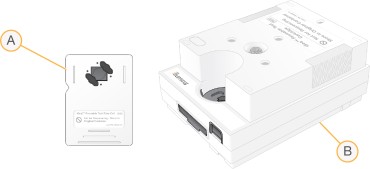
- Reusable test flow cell
- Reusable test cartridge
The reusable test components look similar to the sequencing components provided in iSeq 100 i1 Reagent kits, and the loading orientations are the same. However, the test cartridge does not have a library reservoir and neither test component has the chemistry needed for a run.
The reusable test components expire 5 years from the date of manufacture. Replace reusable test components that have expired or reached the maximum number of uses with the iSeq 100 System test kit.
