
Minimize the Control Software
Minimize the control software to access other applications. For example, to browse to the output folder in File Explorer or find a sample sheet.
| 1. | Swipe up on the touch screen to open the Windows taskbar. |
| 2. | Select the iSeq 100 System icon or another application. |
The control software is minimized.
| 3. | [Optional] Attach a keyboard and mouse to the USB ports of the instrument to facilitate navigation and typing outside of the control software. |
Rear Panel Components
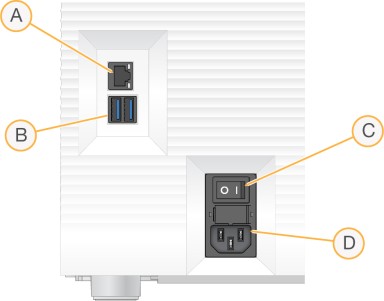
- Ethernet port—Optional Ethernet cable connection.
- USB ports—Two ports for connecting auxiliary components.
- Toggle switch—Turns instrument power on and off.
- AC power inlet—Power cord connection.
| 4. | To maximize the control software, swipe up and select iSeq 100 System. |
