
Find Terminal Processes/Steps
Information about a step is stored in the process resource. In general, automation scripts access information about a step using the processURI, which links to the individual process resource. The input-output-map in the XML returned by the individual process resource gives the script access to the artifacts that were inputs and outputs to the process.
Processing a sample in the lab can be complex and is not always linear. This may be because more than one step (referred to as process in the API and in the Operations Interface in Clarity LIMS v4.x and earlier) is run on the same sample, or because a sample has to be modified or restarted because of quality problems.
The following illustration provides a conceptual representation of a Clarity LIMS workflow and its sample/process hierarchy. In this illustration, the terminal processes are circled.
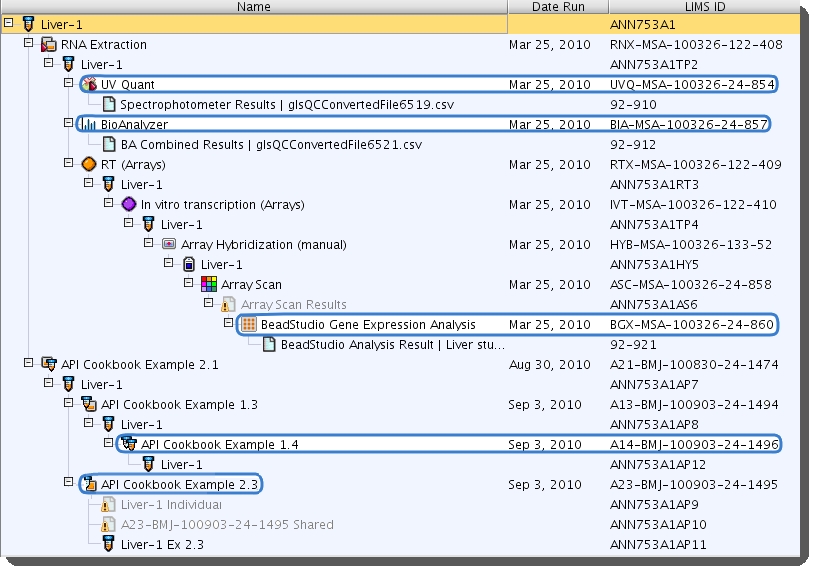
This example finds all terminal artifact (sample)-process pairs. The main steps are as follows.
| 1. | All the processes run on a sample are listed with a process (list) GET method using the ?inputartifactlimsid filter. |
| 2. | All the process outputs for an input sample are found with a process (single) GET. |
| 3. | Iteration through the input-output maps finds all outputs for the input of interest. |
 Prerequisites
Before you follow the example, make sure you have the following items:
| • | A sample to the system. |
| • | Several steps that have been run, with several steps run on a single output at least one time. |
| • | A compatible version of API (v2 r21 or later). |
Code Example
To walk down the hierarchy from a particular sample, you must do the following steps:
| 1. | List all the processes that used the sample as an input. |
| 2. | For each process on that list, find all the output artifacts that used that particular input. These output artifacts represent the next level down the hierarchy. |
| 3. | To find the artifacts for the next level down, repeat steps 1 and 2, starting with each output artifact from the previous round. |
| 4. | To find all artifacts in the hierarchy, repeat this process until there are no more output artifacts. The last processes found are the terminal processes. |
This example starts from the original submitted sample.
Step 1. Retrieve the Sample Resource and Find its Analyte Artifact (Derived Sample) URI
The first step is to retrieve the sample resource via a GET call and find its analyte artifact (derived sample) URI. The analyte artifact of the sample is the input to the first process in the sample hierarchy.
The following GET method provides the full XML structure for the sample including the analyte artifact URI:
// Retrieve the sample sampleURI = "http://${hostname}/api/v2/samples/${sampleLIMSID}" sample = GLSRestApiUtils.httpGET(sampleURI, username, password) // Initialize storage variables targetAnalyteLIMSID = sample.artifact.@limsid[0] artifactMap = [:] artifactMap[targetAnalyteLIMSID] = null lastProcMap = [:] processesURI = "http://${hostname}/api/v2/processes?inputartifactlimsid="
| • | The sample.artifact.@limsid contains the original analyte LIMS ID of the sample. For each level of the hierarchy, the artifacts are stored in a Groovy Map called artifactMap. The artifactMap uses the process that generated the artifact as the value, and the artifact LIMS ID as the key. At the top sample level, the list is only comprised of the analyte of the original sample. In the map, the process is set to null for this sample analyte. |
Step 2. Find All of the Processes Run on the Artifact
To find all the processes run on the artifacts, use a GET method on the process (list) resource with the ? inputartifactlimsid filter.
In the last line of the example code, the processURI string sets up the first part of the URI. The artifact LIMSID is added (concatenated) for each GET call in the following while loop:
// While there are still output artifacts to process outputArtifactsExist = true while (outputArtifactsExist) { outputArtifactMap = [:] artifactMap.each { key, value -> // Retrieve a list of processes that have the given artifact as an input processes = GLSRestApiUtils.httpGET(processesURI + key, username, password) processes.'process'.each { process = GLSRestApiUtils.httpGET(it.@uri, username, password) // For each input-output-map, add the process limsid to the storage map process.'input-output-map'.each { iomap -> if(key == iomap.input.@limsid[0]) { outputArtifactMap[iomap.output.@limsid[0]] = process.@limsid } } } // If there were no processes if(!processes.'process') { lastProcMap[key] = value } } // If there are no more artifacts to process, set variable to exit if(outputArtifactMap.isEmpty()) { outputArtifactsExist = false } else { artifactMap = outputArtifactMap } }
The while loop evaluates one level of the hierarchy for every iteration. Each artifact at that level is evaluated. If that artifact was not used as an input to a process, an artifact/process key value pair is stored in the lastProcMap. All the Groovy maps in the previous code use this artifact/process pair structure.
The loop continues until there are no artifacts that had outputs generated. For each artifact evaluated, the processes that used the artifact as an input are found and collected in the processes variable. Because a process can be run without producing outputs, a GET call is done for each of the processes to determine if the artifact generated any outputs.
Any outputs found will form the next level of the hierarchy. The outputs are temporarily collected in the outputArtifactMap. If no processes were found for that artifact, then it is an end leaf node of a hierarchy branch. Those artifact/process pairs are collected in the lastProcMap .
You can iterate through each pair of artifact and process LIMS IDs in outputArtifactMap and print the results to standard output.
// Print the artifact associated with the given process limsid lastProcMap.each { key, value -> println value + ',' + key }
Expected Output and Results
Running the script in a console produces the following output:
UVQ-MSA-100326-24-854,92-910 BIA-MSA-100326-24-857,92-912 A23-BMJ-100903-24-1495,ANN753A1AP11 A23-BMJ-100903-24-1495,ANN753A1AP10 A23-BMJ-100903-24-1495,ANN753A1AP9 A14-BMJ-100903-24-1496,ANN753A1AP12 BGX-MSA-100326-24-860,92-921
