Update Sample Information
The most important information about a sample is often recorded in custom fields in API (v2 r21 and later). These fields often contain information that is critical to the processing of the sample, such as species or sample type.
When samples come into the lab, you can provide lab scientists with information about priority or quality. You can provide this information by changing the value of specific sample custom fields.
This example shows how to change the value of a sample custom field called Priority after you have entered a submitted sample into the system.
As of Clarity LIMS v5, the term user-defined field (UDF) has been replaced with custom field in the user interface. However, the API resource is still called UDF.
There are two types of custom fields:
| • | Master step fields—Configured on master steps. Master step fields only apply to the following: |
| • | The master step on which the fields are configured. |
| • | The steps derived from those master steps. |
| • | Global fields—Configured on entities (eg, submitted sample, derived sample, measurement, etc.). Global fields apply to the entire Clarity LIMS system. |
 Code Example
In Clarity LIMS, you can display detailed information for a sample, including the following:
| • | Name |
| • | Clarity LIMS ID |
| • | Custom fields |
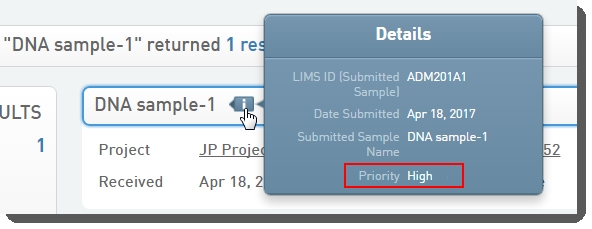
In the following figure, you can see that the sample name is DNA Sample-1 and the field named Priority has the value High.
In this example, change the value of the Priority custom field to Critical.
Step 1: Retrieve the Resource
Before you can change the value of the field, you must first request the resource via a GET method.
To change a sample submitted in Clarity LIMS, use the individual sample resource. The XML returned from a GET on the individual sample resource contains the information about the sample.
The following GET method returns the full XML structure for the sample:
// Retrieve the sample
sampleURI = "http://${hostname}/api/v2/samples/${sampleID}"
sample = GLSRestApiUtils.httpGET(sampleURI, username, password)
The sample variable now holds the complete XML structure returned from the sample GET request.
The XML representations of individual REST resources are self-contained entities. Always request the complete XML representation before editing any portion of the XML. If you do not use the complete XML when you update the resource, you can inadvertently change data.
The following shows XML returned for the sample, with the Priority field shown in red in the second to last line. In this example:
| • | The Clarity LIMS configuration has added three fields to the expanded sample information. |
| • | The custom fields are named Sample Type, PhenotypicInformation, and Priority . |
<smp:sample uri="http://yourIPaddress/api/v2/samples/ADM201A1" limsid="ADM201A1">
<name>DNA sample-1</name>
<date-received>2017-04-18</date-received>
<project uri="http://yourIPaddress/api/v2/projects/ADM201" limsid="ADM201"/>
<artifact uri="http://yourIPaddress/api/v2/artifacts/ADM201A1PA1?state=2995" limsid="ADM201A1PA1"/>
<udf:field type="String" name="Sample Type">DNA</udf:field>
<udf:field type="String" name="Phenotypic Information">Human</udf:field>
<udf:field type="String" name="Priority">High</udf:field>
</smp:sample>
Step 2: Update the Sample Custom Field
When updating the Priority field, you need to do the following:
| • | Change the value in the XML. |
| • | Use a PUT method to update the sample resource. |
You can change the value for Priority to Critical by using the utility files setUdfValue method.
The subsequent PUT method updates the sample resource at the specified URI using the complete XML representation, which includes the new custom field value for XML.
// Update the sample's Priority UDF value
sample = GLSRestApiUtils.setUdfValue(sample, 'Priority', 'Critical')
returnNode = GLSRestApiUtils.httpPUT(sample, sample.@uri, username, password)
println GLSRestApiUtils.nodeToXmlString(returnNode)
A successful PUT returns the new XML in the returnNode. The results can also be reviewed in a web browser at <YourIPaddress>/api/v2/samples/<SampleLIMSID> URI.
An unsuccessful PUT returns the HTTP response code and message in the returnNode XML .
The values for the other two fields, Sample Type and Phenotypic Information, did not change. These values did not change because they were included in the XML used in the PUT (eg, they were held in the sample variable as part of the complete XML structure).
If those custom fields had not been included in the XML, they would have been updated to have no value.
Expected Output and Results
The following XML from our example shows the expected output:
<smp:sample uri="http://yourIPaddress/api/v2/samples/ADM201A1" limsid="ADM201A1">
<name>DNA sample-1</name>
<date-received>2017-04-18</date-received> <project uri="http://yourIPaddress/api/v2/projects/ADM201" limsid="ADM201"/>
<artifact uri="http://yourIPaddress/api/v2/artifacts/ADM503A1PA1?state=2995" limsid="ADM201A1PA1"/>
<udf:field type="String" name="Sample Type">DNA</udf:field>
<udf:field type="String" name="Phenotypic Information">Human</udf:field>
<udf:field type="String" name="Priority">Critical</udf:field>
</smp:sample>
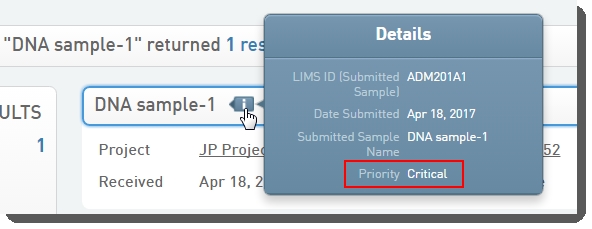
In Clarity LIMS, the updated sample details now show the new Priority value.